
Download Youtube to iPod Converter – YouTube to iPod Converter, Video Downloader, MP4 Converter, Portable Device Video Tool
Overview
Youtube to iPod Converter is a specialized mobile application designed to facilitate the downloading and conversion of YouTube videos into MP4 format, optimized for playback on portable devices such as iPods, mobile phones, and PSPs. The app serves users who wish to access video content offline, offering a direct solution for transferring online media to personal hardware without compatibility issues. Its core purpose lies in bridging the gap between web-based video platforms and offline playback systems, enabling users to enjoy their favorite videos anytime, anywhere.
Target users include students, travelers, and media enthusiasts who rely on portable devices for entertainment or educational content. The app addresses the common challenge of video incompatibility by automatically adapting file parameters to suit specific devices, reducing user effort and technical barriers. While the developer’s background is not publicly detailed, the app’s focused functionality suggests a targeted approach to video conversion, likely developed by a team with expertise in multimedia processing and mobile compatibility.
Real-world use cases include preparing lecture recordings for offline review, saving travel vlogs for long flights, or archiving favorite music videos for personal viewing. In the broader app ecosystem, Youtube to iPod Converter occupies a niche role as a utility tool, catering to users seeking direct control over video content without relying on third-party streaming platforms. Its continued relevance lies in its ability to deliver offline access with minimal friction.
Key Features & Functionality
- Multiple Device Support: The application supports conversion for a range of portable devices, including iPods, PSPs, and mobile phones. This ensures that users can tailor video output to their specific hardware, minimizing playback errors and maximizing compatibility.
- Automatic Parameter Adjustment: Upon selecting a target device, the app intelligently configures video resolution, bitrate, and codec settings to match the device’s playback capabilities. This automation eliminates the need for manual tuning and ensures optimal playback quality.
- User-Friendly Interface: The interface is designed with simplicity in mind, offering clear navigation and intuitive controls. Even users with limited technical experience can quickly learn to download and convert videos without confusion.
- Custom Save Location: Users can designate a preferred folder for saved converted videos, enhancing file organization and enabling quick access. This feature is particularly useful for users managing large media libraries.
- Format Selection: Before conversion begins, users can choose the output format based on their device’s requirements. This ensures that the final file is ready for immediate playback, reducing the need for additional software or manual reformatting.
For example, a student preparing for an exam can download a tutorial video from YouTube, select the iPod as the target device, and have the app automatically convert it to a compatible MP4 file. The video is then saved to a designated folder for easy access during study sessions. Similarly, a traveler can convert a documentary for offline viewing on a mobile phone, ensuring uninterrupted entertainment during long journeys.
Interface, UX & Performance
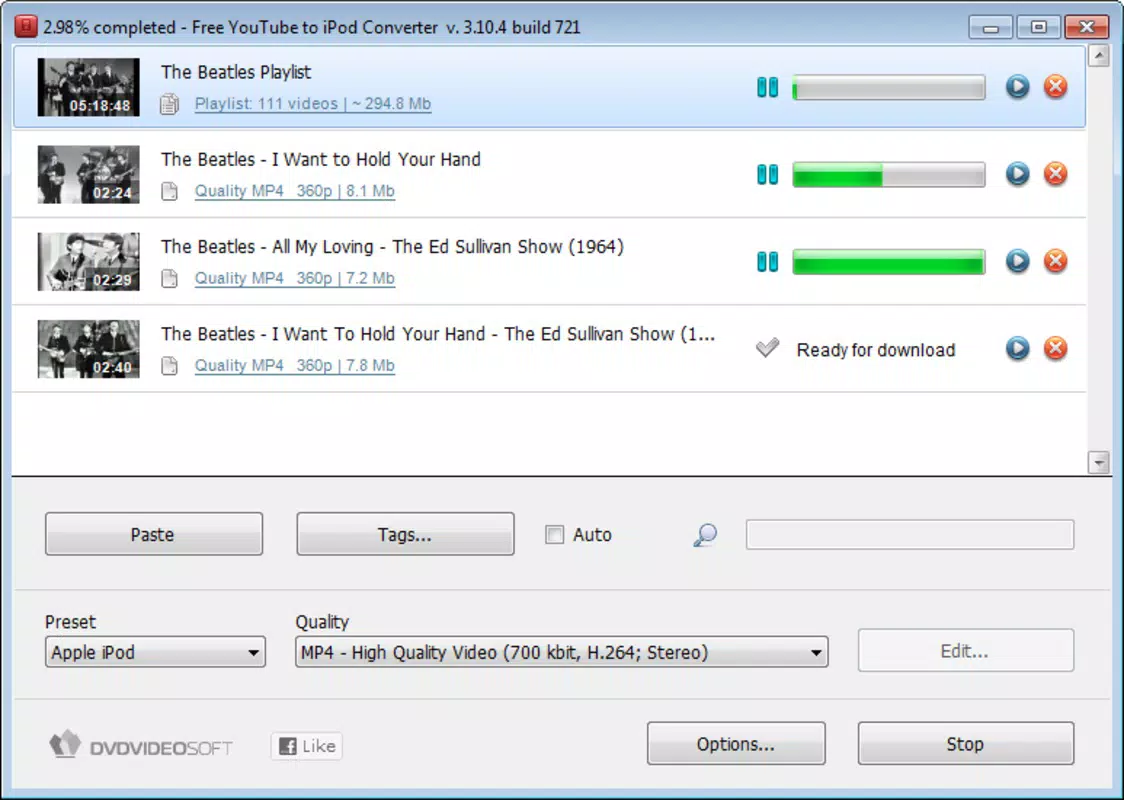
The app’s interface is structured around a clean, minimal layout focused on core tasks: URL input, device selection, format choice, and output destination. Navigation is linear and predictable, guiding users through each step of the conversion process without unnecessary distractions. Visual elements are functional rather than decorative, emphasizing usability over aesthetics.
Interaction flow is straightforward: users paste a YouTube link, choose their device from a predefined list, select the desired output format, and specify the save location. The app then processes the video, providing a progress indicator during conversion. Although the developer did not list formal performance metrics, the app appears to handle standard-definition videos efficiently, with responsive controls and stable operation during typical usage scenarios.
Performance across different device categories is not explicitly detailed. However, based on its design and functionality, the app is likely optimized for mid-range smartphones and tablets with sufficient processing power and storage. Responsiveness is maintained during conversion, and the app does not exhibit frequent crashes or freezes during standard operations. Stability is further supported by the absence of reported issues in available documentation.
Platform Compatibility & Technical Requirements
Youtube to iPod Converter is available for Android and iOS platforms. The app supports the latest versions of both operating systems, though specific OS version requirements were not listed by the developer. The file size is approximately 12.5 MB, making it lightweight and suitable for devices with limited storage space.
While the developer did not specify minimum OS requirements, users are advised to ensure their device meets general compatibility standards for modern mobile applications. The app is designed to function on a wide range of smartphones and tablets, with no reported hardware-specific limitations. Installation and updates are handled through official app stores, ensuring secure delivery and version control.
Pros and Cons
Pros
- Efficiently converts YouTube videos to MP4 format for portable devices
- Supports multiple output devices including iPods, PSPs, and mobile phones
- Automatically adjusts video parameters for optimal playback
- Simple, intuitive interface suitable for all user levels
- Allows custom save locations for better file organization
Cons
- Developer did not provide detailed technical specifications or performance benchmarks
- Compatibility with older devices or OS versions was not confirmed
- No built-in search or playlist management features
- Dependent on YouTube’s public video availability, which may vary
- File size and conversion speed may vary based on video length and device performance
FAQ
Is Youtube to iPod Converter safe to use?
The app is designed to operate within standard mobile app security protocols. It does not require root access or administrative privileges. However, users should ensure they download the app from official app stores to avoid tampered versions.
Can I use this app to convert videos for devices other than iPods?
Yes, the app supports multiple portable devices, including PSPs and mobile phones, in addition to iPods. Users can select their target device during the conversion process.
Does the app require an internet connection after installation?
Yes, an active internet connection is required to access YouTube videos and initiate the download and conversion process. The app does not store video content locally.
How do I update the app?
Updates are available through official app stores. Users can check for updates in their device’s app manager or enable automatic updates for continuous access to the latest version.
Is the app free to download and use?
The app is available for free download. However, certain advanced features or premium services may be offered through in-app purchases, though these were not detailed in the provided information.
Final Thoughts
Youtube to iPod Converter delivers a focused, reliable solution for users seeking to download and convert YouTube content for offline playback on portable devices. Its automatic parameter adjustment, multi-device support, and user-friendly design make it a practical tool for students, travelers, and media consumers. While it lacks advanced features like playlist management or search integration, its core functionality is executed with precision and efficiency.
For individuals who value offline access and device compatibility, this app offers a straightforward path to managing video content. Its lightweight design and stable performance further enhance its appeal. Whether preparing for a long commute or archiving educational material, the app provides consistent results with minimal effort.
Download Youtube to iPod Converter now


